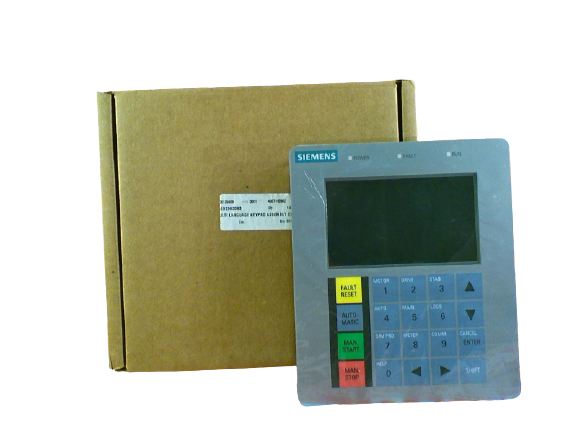


A5E02363383, A5E02669560, A5E39808478, A5E39206479 GH180 Keypad and HMI
A5E02363383, A5E02669560, A5E39808478, A5E39206479 GH180 Keypad and HMI
A5E02363383, MULTI LANGUAGE KEYPAD ASSEMBLY ENGLISH, 6SR0960-0CB15-0AD0, A1A460A68.23, A5E02669560, KEYPAD KIT (English), 6SR3900-0SM20-0BD0, LDZ252090.11NGSC,
A5E39808478, KEYPAD KIT (Simatic), 6SR0960-0SM60-0AD0,
A5E39206479, DEV_CONTROL_SIMATIC HMI, KTP700 BASIC D, 6SR4900-0SM00-0AM0,
Siemens SINAMICS PERFECT HARMONY GH180 VFD has a very easy-to-use keyboard and display interface, installed on the panel of the inverter control cabinet. The keyboard and display interface are used to access the various control parameters and functions of the perfect harmonic-free inverter. The parameters are organized into logical groups by the menu structure to facilitate viewing and setting. To view or edit parameters, the operator must operate through the menu to find the desired parameter, which can be scrolled through one by one through the up and down arrow keys, or can be quickly accessed through a specific key sequence. A summary table of these key sequences is available later in this chapter. The shift key [SHIFT] (used in combination with 10 number keys and [ENTER]) is used to access 9 frequently used system menus, 1 help display function, and 1 cancel [CANCEL] operation. The keyboard is used to browse the menu structure, perform control functions, reset the inverter when a fault occurs, edit parameter values, enter security passwords, and set the system to automatic, manual, or stop (automatic/manual/stop) mode. There are 20 keys in the Perfect Harmonic Frequency Inverter keyboard, and each key corresponds to at least one function. Some keys have 2 or more functions.
Previous : A5E32100313, 6SR0960-0CC07-1AD0, Siemens SINAMICS PERFECT HARMONY GH180 24VDC User IO Board
Next : A5E36968571; GH180; NXGPRO; A5E32168144; 6SR0960-0CC16-0AD0 Siemens GH180 signal conditioning board


 Copy product links
 Long by picture save/share
INQUIRY


Add Successfully
We are the world's leading supplier of spare parts for medium voltage drives of various brands

点击右上角
分享给朋友吧
GET IN TOUCH

East Sun Industrial Centre, No 16 Shing Yip Street Kl, Hongkong

Call us : +852 5261 7322

Email us : [email protected]
SITEMAP
BUSINESS HOURS
Monday to Friday : 9 am to 6 pm
Saturday : 9 am to 12 am
Sunday : Closed Support Hours in 24/7 Everyday
DISCLAIMER:
We are not an authorized distributor, reseller or representative of the following products presented on this website. All Product names and logos throughout this site are trademarks of their respective holders. Use of them DOES NOT imply any affiliation with or endorsement by them.
© 2020 robiconperfectharmony.com site . All rights reserved Site Map
